Case & Matter Management
Guide #4: Matters & Case Intake
Complete guide to managing your litigation portfolio: exploring the active matter ledger, creating private or firm cases, linking verified clients, batch-ingesting dockets with bulk CNR tools, and tracking case progression across the 5-stage pipeline board.
7 min read•Matters•Updated October 2026
Prerequisites
- Active Advocate Account (Solo Practice or Law Firm)
- Approved Bar Council KYC Verification
- Basic case details: Dispute Title, Court / Forum, Petition / CNR Number, and Client Name
1.Explore the Matters Dashboard & Active Portfolio
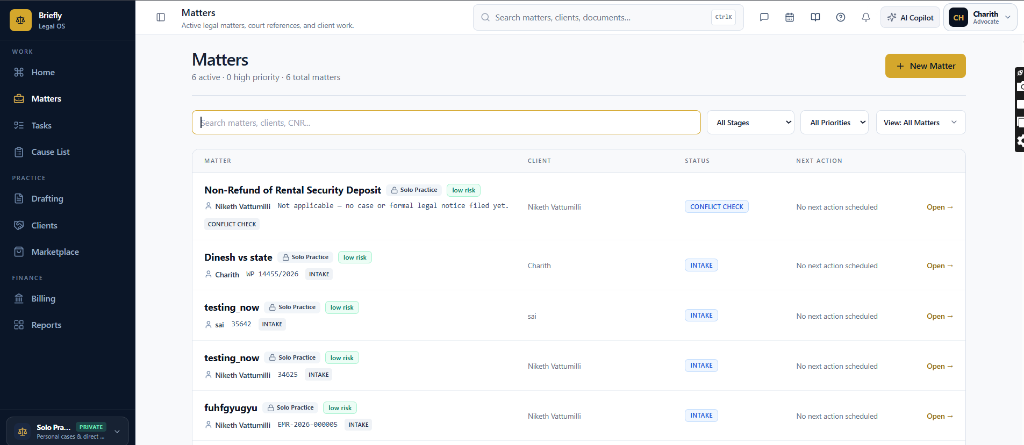
Navigate to Matters from the left navigation to view and filter your chamber's active litigation dockets.
Controls:Search matters, clients, CNR...All StagesAll Priorities+ New Matter(Primary action)Open →(Row action link)
- Caseload summary: Real-time metric counters track active cases, high-priority mentions, and total chamber matters.
- Universal search: Search by case caption, client name, petition number, or 16-character e-Courts CNR string using the Search matters, clients, CNR... input.
- Procedural stage filters: Use the All Stages dropdown to filter matters by lifecycle phase: Intake, Pre-filing, Notice Issued, Evidence, Arguments, Orders / Judgment, and Disposed.
- Operational priority filter: Isolate emergency mentions, stay applications, and interim bails using the All Priorities dropdown.
- Portfolio ledger table: Displays matter caption, practice scope (Solo Practice vs Firm), procedural status pill, next scheduled action date, and direct Open → access link.
Chamber Authentication Required
Step 1 is shown above as a preview. All remaining procedural steps, litigation blueprints, and interactive controls require an active chamber or firm login.
Frequently Asked Questions
- What is the difference between a Firm Matter and a Solo/Private Matter?
- In a Firm Matter, case files and AI credits are shared with your empanelled law firm and partners. In a Solo / Private Matter, all data is encrypted and strictly isolated within your private chamber under Section 126 of the Evidence Act.
- Can I advance matters across stages without opening the case file?
- Yes. Open the Pipeline board on the Matters page and drag any card to the desired column, or click Advance → on the card. Status changes save immediately.
- How does the Bulk CNR Import tool work?
- You can paste up to 200 lines containing matter titles and 16-character CNR numbers. The system verifies their format against e-Courts syntax and bulk-generates case files with automated cause list sync.
- What happens when I click Create Matter & Open File?
- Briefly immediately provisions an isolated Case Workspace (/cases/[id]), initializes evidence vault folders, links your verified client, and navigates you straight to the workspace command center.
Was this guide helpful?
Your feedback directly shapes our support documentation.