Guide #17: Evidence & Exhibits
Complete step-by-step walkthrough for advocates: maintaining encrypted evidence vaults, logging immutable chain of custody ledgers, recording forensic transfers, assigning court exhibit endorsements (Ex. P-1 / Ex. D-1), inspecting evidence dossiers, and generating judicial Master Evidence Schedules.
- Active Legal Matter Workspace (/cases/[id])
- Scanned evidence files, electronic records, photographs, or forensic material in PDF, CSV, JPG, or media format
1.Access the Evidence Vault Cockpit & Preservation Items View
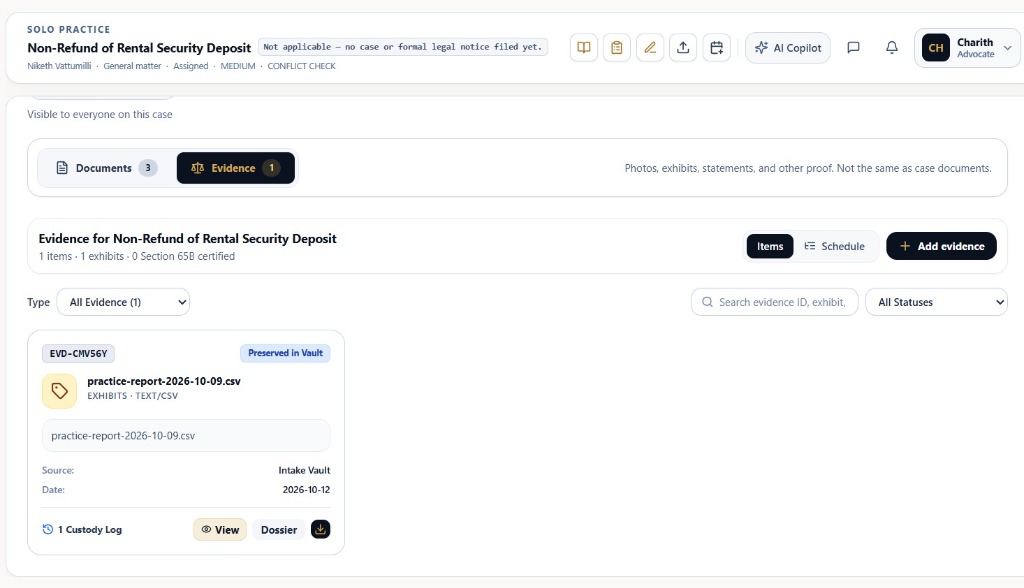
Navigate to `/cases/[id]?tab=evidence` to inspect case proofs, digital exhibits, and preserved items.
- Documents vs. Evidence Segregation: Notice the top switcher showing 'Documents (3)' vs. 'Evidence (1)'. The platform explicitly enforces evidentiary isolation: 'Photos, exhibits, statements, and other proof. Not the same as case documents.'
- Working Drafts vs. Evidence: For procedural pleadings, plaints, written statements, and client requests, refer to Guide #8: Case Documents, In-Browser Drafting Studio & Client Document Requests↗.
- Live Evidentiary Metrics: Cockpit summary strip dynamically computes total evidentiary footprint: '1 items · 1 exhibits · 0 Section 65B certified'.
- View Mode Toggle: Seamlessly toggle between 'Items' (card-based preservation grid) and 'Schedule' (tabular judicial trial index).
- Search & Filters: Filter instantly using 'Type: All Evidence (1)', text search ('Search evidence ID, exhibit, ...'), and 'All Statuses' dropdown.
- Preserved Vault Card: Each evidence item displays: system tracking code ('EVD-CMV56Y'), filename ('practice-report-2026-10-09.csv'), status badge ('Preserved in Vault'), category tags ('EXHIBITS · TEXT/CSV'), provenance source ('Intake Vault'), intake date ('2026-10-12'), and custody tally ('1 Custody Log').
- Action Launchers: Click 'View' to preview the file, 'Dossier' to review evidentiary relevance and court markings, download icon for local retrieval, or '+ Add evidence' to ingest new proofs.
Never mix evidentiary trial exhibits with working pleadings. Working drafts, notices, and client intake correspondence belong in [Guide #8: Case Documents](/help/document-vault-and-ocr). The Evidence Vault is reserved for marked trial exhibits, electronic records requiring Section 65B certification, and chain-of-custody tracking.
Chamber Authentication Required
Step 1 is shown above as a preview. All remaining procedural steps, litigation blueprints, and interactive controls require an active chamber or firm login.
Frequently Asked Questions
- What is the difference between Case Documents (Guide #8) and Evidence Vault (Guide #9)?
- Case Documents (/cases/[id]?tab=documents) is for procedural pleadings, plaints, written statements, working drafts, and client intake requests. Evidence Vault (/cases/[id]?tab=evidence) is reserved for marked trial exhibits (Ex. P-1 / Ex. D-1), forensic proofs, chain-of-custody ledgers, and Section 65B electronic evidence certificates.
- How do I mark an exhibit during court examination?
- Open the item's Dossier in the Evidence Vault, navigate to the 'Court Exhibit Endorsement' field, type the assigned exhibit number (e.g., Ex. P-1 or Ex. D-2), and click 'Save Exhibit #'. This immediately updates the Master Schedule and all court brief exports.
- Can I record evidence sent to an external forensic laboratory (FSL)?
- Yes. In the Chain of Custody Ledger, use the 'Record Custody Transfer' form to specify the receiving custodian (e.g., FSL), action/purpose (e.g., Forensics / Fingerprint analysis), storage location, and seal condition.
Was this guide helpful?
Your feedback directly shapes our support documentation.