Guide #15: Case Chronology & Court Briefs
Complete step-by-step walkthrough for advocates: why a master chronology is the foundation of trial strategy, how to log material dates, track admitted vs. disputed facts, deploy the AI Chronology Extractor, generate 3-column court tables, and export print-ready Senior Counsel briefs.
- Active Legal Matter Workspace (/cases/[id])
- Case documents, police complaints, FIRs, contracts, or court notices to extract or cross-reference
1.Why Chronology Wins Cases & Navigating the Master Chronology Cockpit
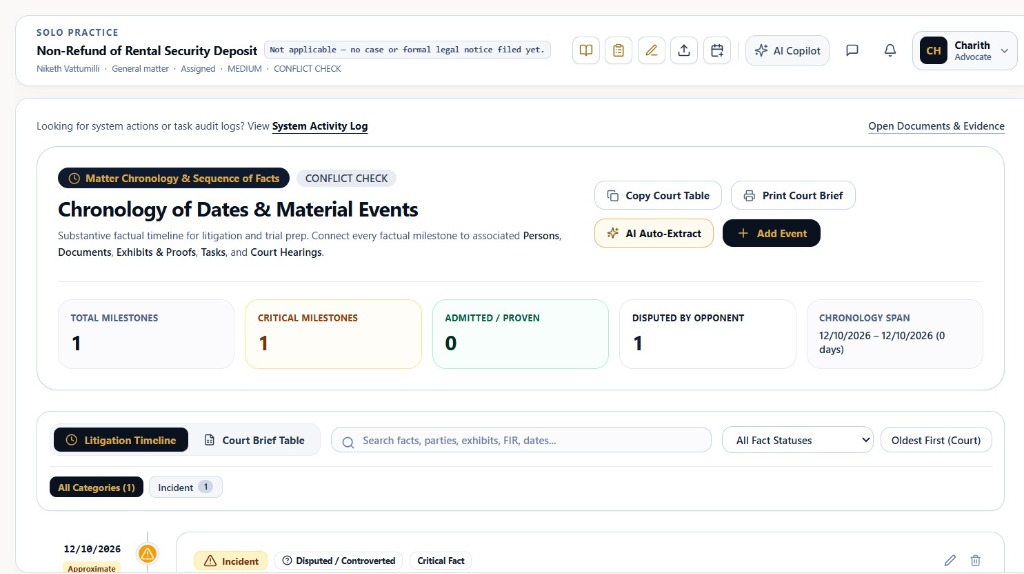
Navigate to `/cases/[id]?tab=chronology` to access the substantive factual timeline for litigation, trial preparation, and appellate briefs.
- Why Chronology Matters in Indian Litigation: In Indian courts (Supreme Court, High Courts, and Trial Courts), judges decide admissions, injunctions, and interim relief largely on the 'List of Dates & Synopsis'. Order VI Rule 2 CPC mandates pleading facts, not evidence; an airtight chronological narrative establishes cause of action, refutes limitation challenges under the Limitation Act 1963, and reveals contradictions in the opponent's case.
- Substantive Metric Summary Strip: Provides an instant statistical overview of the factual record:
- • TOTAL MILESTONES (1): Total verified historical and procedural events logged in this case.
- • CRITICAL MILESTONES (1): Core turning points (e.g., date of cause of action, default on contract, lodging of police complaint, statutory demand notice).
- • ADMITTED / PROVEN (0): Facts explicitly conceded by opposing parties in written statements or established by registered public records.
- • DISPUTED BY OPPONENT (1): Controverted factual claims that form the core triable issues for trial evidence and witness cross-examination.
- • CHRONOLOGY SPAN: Historical range spanning from initial cause to present day (e.g., '12/10/2026 – 12/10/2026 · 0 days').
- Quick Utility Actions: Header features instant launchers for 'Copy Court Table', 'Print Court Brief', '✨ AI Auto-Extract', and '+ Add Event'.
- Dual View Switcher: Seamlessly toggle between 'Litigation Timeline' (visual ribbon with relational cards) and 'Court Brief Table' (official 3-column judicial format).
- Filter & Sorting Tools: Search across facts, parties, exhibits, FIRs, and dates; filter by 'All Fact Statuses' and sort by 'Oldest First (Court)' or newest first.
Senior Advocates and arguing counsel rely first and foremost on the List of Dates to address the bench. A disorganized chronology damages credibility; Briefly Legal OS structures your dates with verified exhibit citations.
Chamber Authentication Required
Step 1 is shown above as a preview. All remaining procedural steps, litigation blueprints, and interactive controls require an active chamber or firm login.
Frequently Asked Questions
- Why is a master chronology essential before filing a petition in High Court or Supreme Court?
- Every petition requires a formal 'List of Dates & Synopsis'. If material dates contradict documents or pleadings, courts can dismiss petitions on grounds of suppression of material facts or limitation default. Briefly Legal OS ensures every date is cross-referenced with vault evidence.
- What is the difference between Admitted and Disputed facts in the chronology?
- Admitted facts are accepted by both sides (e.g., date of marriage, execution of registered lease) and do not require strict trial proof under Section 58 of the Indian Evidence Act. Disputed facts are contested points (e.g., date of alleged default, notice delivery) that require evidence, exhibits, and witness cross-examination.
- Can I copy the Court Brief Table directly into my legal drafting software?
- Yes. Clicking 'Copy Formatted Table' captures the entire 3-column table with borders and styling so you can paste it directly into Microsoft Word, Google Docs, or Briefly Paper Studio.
- How does the AI Chronology Extractor protect client confidentiality?
- All document extraction runs within Briefly Legal OS's isolated tenancy sandbox. Documents are never used to train public foundation models, ensuring complete compliance with Bar Council confidentiality standards.
- What happens if a document has an approximate date?
- You can toggle the event as 'Approximate Date'. The timeline will flag the node with an amber approximate indicator and note it in the Court Brief Table as 'Approx' to prevent misleading the bench.
Was this guide helpful?
Your feedback directly shapes our support documentation.