Guide #16: Litigation Strategy & Issues
Complete step-by-step walkthrough for advocates: framing triable issues under Order XIV CPC, mapping the 5-stage evidentiary progression, attaching marked exhibits and witness strategies, structuring cross-examination traps, and generating court-ready Oral Argument Outlines.
- Active Legal Matter Workspace (/cases/[id])
- Pleadings, plaint, or written statement filed or drafted
- Understanding of Order XIV Code of Civil Procedure (Framing of Issues)
1.Navigate Litigation Strategy Cockpit & Issues Matrix
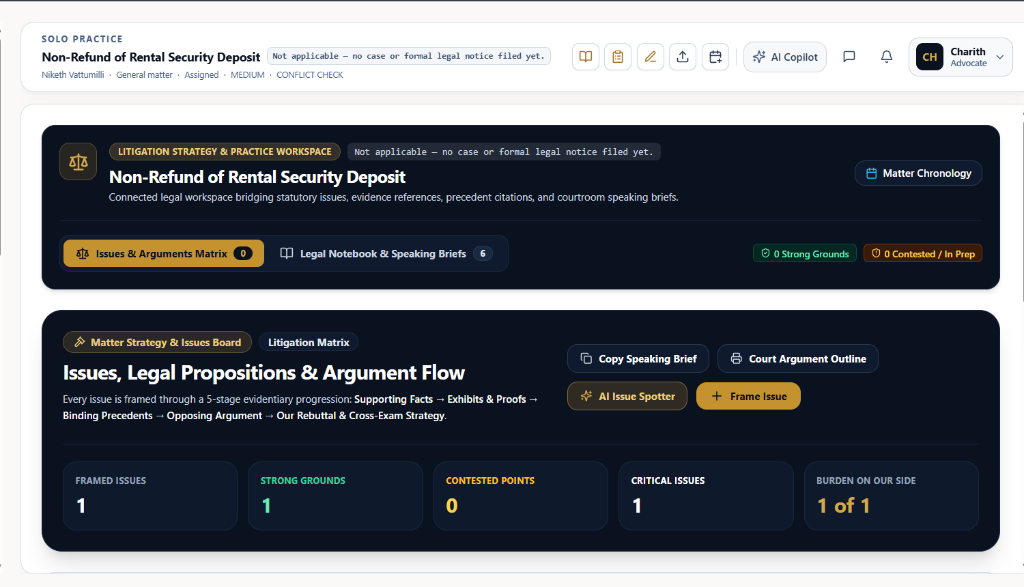
Open `/cases/[id]?tab=strategy` to review your litigation theory, framed legal propositions, and strategic metric indicators.
- Strategy & Practice Workspace: Serves as the central nerve center connecting statutory questions of law, marked trial evidence, precedent citations, and courtroom speaking briefs.
- Dual Sub-Tab Switcher: Toggle between 'Issues & Arguments Matrix (0)' and 'Legal Notebook & Speaking Briefs (6)'.
- Companion Guide Hyperlink: For precedent research, case citations, and substantive speaking notes, explore the companion Guide #11: Legal Notebook & Speaking Briefs↗.
- Cross-Reference to Chronology: Click 'Matter Chronology' at the upper right to cross-reference dates and factual sequences in Guide #7: Master Case Chronology & Court Briefs↗.
- Real-Time Cockpit Metrics Strip: Tracks 5 vital trial velocity indicators:
- • FRAMED ISSUES: Total count of active triable propositions (e.g., '1').
- • STRONG GROUNDS: Statistically dominant propositions favorable to your client (e.g., '1').
- • CONTESTED POINTS: Disputed factual questions under heavy opposing rebuttal (e.g., '0').
- • CRITICAL ISSUES: High-stakes propositions that determine suit maintainability or decree grant (e.g., '1').
- • BURDEN ON OUR SIDE: Proportions of burden of proof resting on your client under Sections 101–106 Indian Evidence Act (e.g., '1 of 1').
- Rapid Action Launchers: Quick access to 'Copy Speaking Brief', 'Court Argument Outline', 'AI Issue Spotter', and '+ Frame Issue'.
Align your framed issues with the judicial bench's formal Order XIV CPC issues order. This ensures courtroom speaking briefs directly answer the exact points formulated by the judge.
Chamber Authentication Required
Step 1 is shown above as a preview. All remaining procedural steps, litigation blueprints, and interactive controls require an active chamber or firm login.
Frequently Asked Questions
- How do framed issues connect to Case Evidence Vault (Guide #9)?
- When framing an issue, you can directly attach marked trial exhibits from the Evidence Vault (such as 'Ex. P-1: practice-report-2026-10-09.csv'). These exhibits automatically populate the '2. Evidentiary Proofs' section of the issue card, creating an unbroken evidentiary foundation.
- Where can I find legal precedents and research notes for my issues?
- Use the top switcher on the Litigation Strategy cockpit to toggle to 'Legal Notebook & Speaking Briefs'. You can also explore the dedicated [Guide #11: Legal Notebook & Speaking Briefs](/help/case-legal-notebooks-and-research) for structuring case citations, ratio decidendi, and legal authorities.
- How does the Burden of Proof tag influence courtroom strategy?
- Tagging whether the onus probandi lies on 'On Us / Petitioner' or 'On Opponent / Respondent' under Sections 101–106 of the Indian Evidence Act helps advocates determine whether to lead affirmative trial evidence or hold the line on cross-examination to establish failure of proof by the other side.
Was this guide helpful?
Your feedback directly shapes our support documentation.