Case Documents, In-Browser Drafting Studio & Client Document Requests — Vault Management, Private Space & OCR
Complete step-by-step walkthrough for advocates: organizing matter pleadings, isolating confidential work in Private Space, deploying the in-browser Paper Studio for court-compliant drafting (1.75" left binding margins), managing client document intake requests, and distinguishing between Legal Documents and Evidence Vault trial proofs.
- Active Legal Matter Workspace (/cases/[id])
- Case documents, notices, petitions, or working drafts in PDF, DOCX, or text format
1.Navigate the Case Documents Hub & Switch Between Documents vs. Evidence
Access `/cases/[id]?tab=documents` to manage matter pleadings, orders, working drafts, and client intake papers.
- Legal Documents vs. Evidence Vault Switcher: Notice the primary top toggle: 'Documents (1)' vs. 'Evidence (0)'. The platform enforces strict procedural segregation — 'Documents' holds working drafts, filed pleadings, registry court orders, and client correspondence; 'Evidence Vault & Exhibits' holds marked trial proofs, digital exhibits, police seizure memos, and Section 65B Indian Evidence Act electronic certificates.
- Cross-Reference to Evidence: To manage marked trial exhibits, forensic chains of custody, and Section 65B certificates, explore Guide #9: Case Evidence Vault, Trial Exhibits & Chain of Custody↗.
- Sub-Navigation Views: Toggle between 'Files (1)' (uploaded and indexed PDFs), 'Draft' (in-progress pleadings in Paper Studio), and 'Requests (1)' (intake demands sent to litigants).
- Fast Action Launchers: Click 'New draft' to launch Paper Studio in your browser, or 'Upload file' to ingest client PDFs or court orders.
- Live Document Metric Counters: Top summary strip tracks: '1 files · 1 drafts · 0 final · 55.5 KB · 1 searchable'.
- Category Filter Badges: Rapidly filter documents by procedural lifecycle stage: 'All Documents (1)', 'Working Drafts (1)', 'Final (0)', 'Filed (0)', 'Received (0)', 'Client Documents (0)', and 'Court Documents (0)'.
- Interactive Document Cards: Review file titles (e.g., 'BRIEFLY_Intern_Complete_Pro...'), lifecycle badges ('Working Drafts'), version tag ('v1 · 55.5 KB'), and status ('OCR Ready').
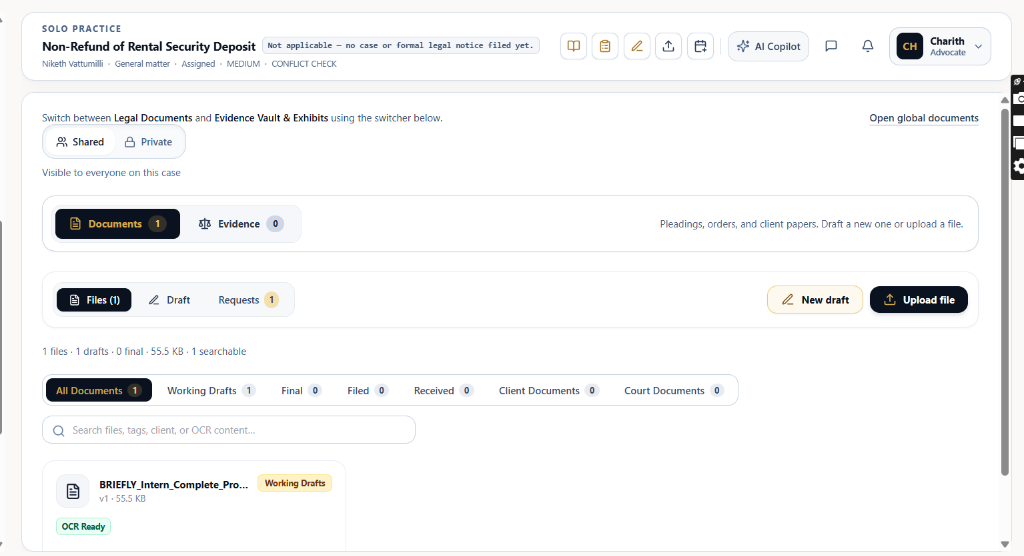
Never mix working drafts with trial evidence. Working drafts, memos, and client instructions belong here under 'Documents'. Marked trial exhibits (Ex. P-1, Ex. D-1) and Section 65B affidavits must be managed in the dedicated [Guide #9: Evidence Vault & Exhibits](/help/case-evidence-vault-and-exhibits).
Chamber Authentication Required
Step 1 is shown above as a preview. All remaining procedural steps, litigation blueprints, and interactive controls require an active chamber or firm login.
Frequently Asked Questions
- How do Legal Documents differ from Evidence Vault items?
- Legal Documents contains procedural pleadings, plaints, written statements, working drafts, and court orders. Evidence Vault & Exhibits is reserved for marked trial exhibits (Ex. P-1, Ex. D-1), forensic proofs, and Section 65B electronic evidence certificates. You can explore the dedicated [Case Evidence Vault & Exhibits Guide](/help/case-evidence-vault-and-exhibits) for evidence rules.
- What is the difference between Shared and Private space in Documents?
- Shared space is accessible to all permitted case collaborators (co-counsels, associates, or clients depending on workspace permissions). Private space ('Only you can see this') is strictly isolated to your individual advocate account, ensuring sensitive police reports, client recordings, unfiled draft strategies, and privileged work products are completely hidden from clients and external participants.
- Why does Paper Studio enforce a 1.75-inch left margin?
- Indian High Courts and the Supreme Court mandate a 1.75-inch (4.5 cm) left margin to allow for physical thread stitching and binding of paper books without obscuring text. Paper Studio enforces this standard automatically.
- How are clients notified when I create a document request?
- When you send a document request, the client receives an instant SMS notification and WhatsApp prompt with a secure direct link to upload their files, which automatically sync into this matter workspace.
- Does the OCR engine work on scanned bilingual documents?
- Yes. Briefly's deep OCR pipeline processes both English and Hindi text, including official court rubber stamps and vernacular FIR transcripts.
- Can I download my drafts to Microsoft Word (.docx)?
- Yes. Clicking 'Download' inside Paper Studio allows exporting as formatted Word (.docx) or court-ready PDF with preserved margins and typography.
Was this guide helpful?
Your feedback directly shapes our support documentation.