Case & Matter Management
Guide #18: Court Records & Statutes
Track official e-Courts CNR registry codes, filing petition numbers, bench corams, and map governing civil & criminal statutory sections for AI precedent discovery.
6 min read•Court Records & Statutory Provisions•Updated October 2026
Prerequisites
- Active Matter Workspace (/cases/[id])
- Filing petition number or 16-character e-Courts CNR number
- Statutory provisions governing the litigation (e.g. NI Act, CPC, BNS, Arbitration Act)
1.Track Official Court CNR & Filing Codes
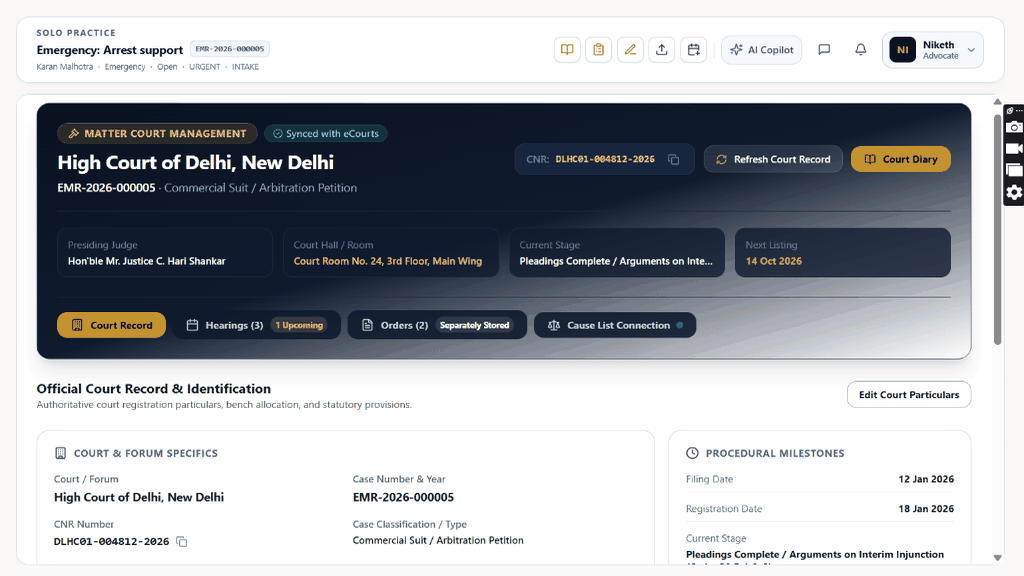
Navigate to `/cases/[id]?tab=records` to manage National Judicial Reference (CNR) codes, petition numbers, and registry dockets.
Controls:Records TabCNR Number InputPetition Number InputCourt Hall Input
- 16-Character CNR Validation: e-Courts CNR (e.g. `KABC010123452026`) enables automated nightly scraping of court cause lists and bench transfers.
- Filing & Registration Numbers: Track Diary Number, Filing Number, and Registration Number across Registry scrutiny stages.
- Judicial Coram & Hall: Record Presiding Judge name, Court Hall number, and Special Bench rosters.
Chamber Authentication Required
Step 1 is shown above as a preview. All remaining procedural steps, litigation blueprints, and interactive controls require an active chamber or firm login.
Frequently Asked Questions
- How do I find the 16-character CNR number for my case?
- The CNR number is printed on the top-right corner of official e-Courts case status receipts and certified order copies. Format: 4-letter court code + 12-digit number.
- Can I add new criminal codes like BNS, BNSS, and BSA?
- Yes. Briefly's statutory database includes both legacy codes (IPC, CrPC, IEA) and the new Indian criminal acts (BNS, BNSS, BSA) with automatic cross-reference tables.
Was this guide helpful?
Your feedback directly shapes our support documentation.