Legal OS for Advocates
Guide #7: Legal Drafting & Paper Studio
Step-by-step guide to drafting court-compliant pleadings, commercial agreements, and statutory notices with 1.75" left margins, dynamic variables, and AI assistance.
5 min read•Drafting & Paper Studio•Updated October 2026
Prerequisites
- Active Lawyer Account
1.Select Indian Legal Template or Blank Court Canvas
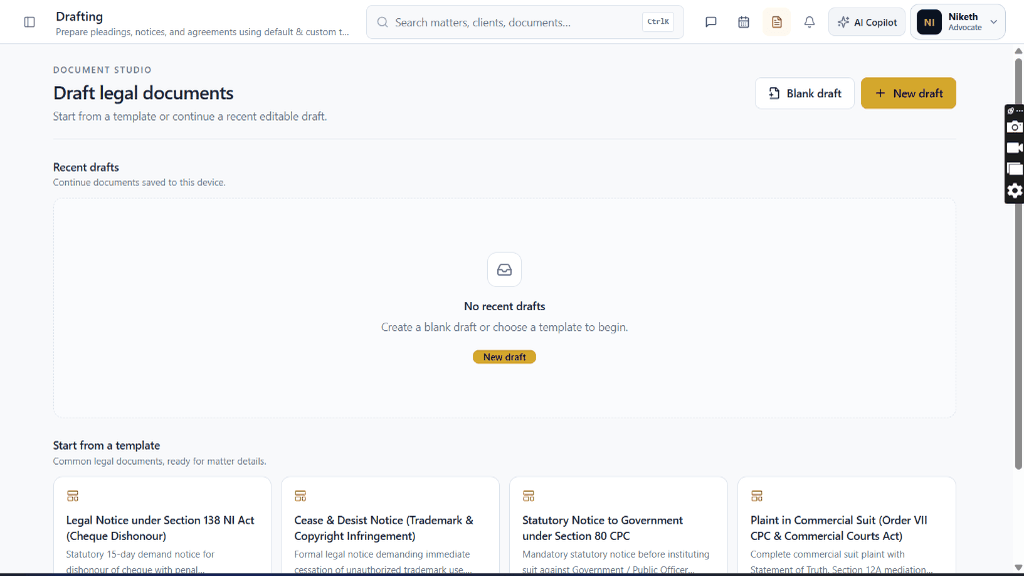
Navigate to `/lawyer/drafting` and select from Section 138 NI Act notice, Cease & Desist, Plaint, or Bail templates.
Controls:Use template →📄 Blank draft
- Pre-formatted with proper court headings, verification affidavits, and standard legal clauses.
Chamber Authentication Required
Step 1 is shown above as a preview. All remaining procedural steps, litigation blueprints, and interactive controls require an active chamber or firm login.
Was this guide helpful?
Your feedback directly shapes our support documentation.