Case & Matter Management
Guide #22: Private Strategy Workspace
Record confidential defense weaknesses, witness credibility risks, judge demeanor observations, and simulate counter-arguments with zero client visibility.
5 min read•Private Sanctum & Defense Strategy•Updated October 2026
Prerequisites
- Active Matter Workspace (/cases/[id])
- Confidential case notes or sensitive trial vulnerabilities to isolate from clients
1.Access the Client-Isolated Private Sanctum
Open `/cases/[id]?tab=sanctum` to enter a strictly isolated workspace protected by client-blind security.
Controls:Private Sanctum Tab+ New Private NotePrivacy Shield Badge
- 100% Client-Blind Isolation: Sanctum data is never exposed in client portal views, shared links, or public matter exports.
- Protected by legal professional privilege under Section 126 of the Indian Evidence Act (Section 132 BSA).
- Use the Sanctum to draft confidential cross-examination traps, note bench temperament, and log client credibility concerns.
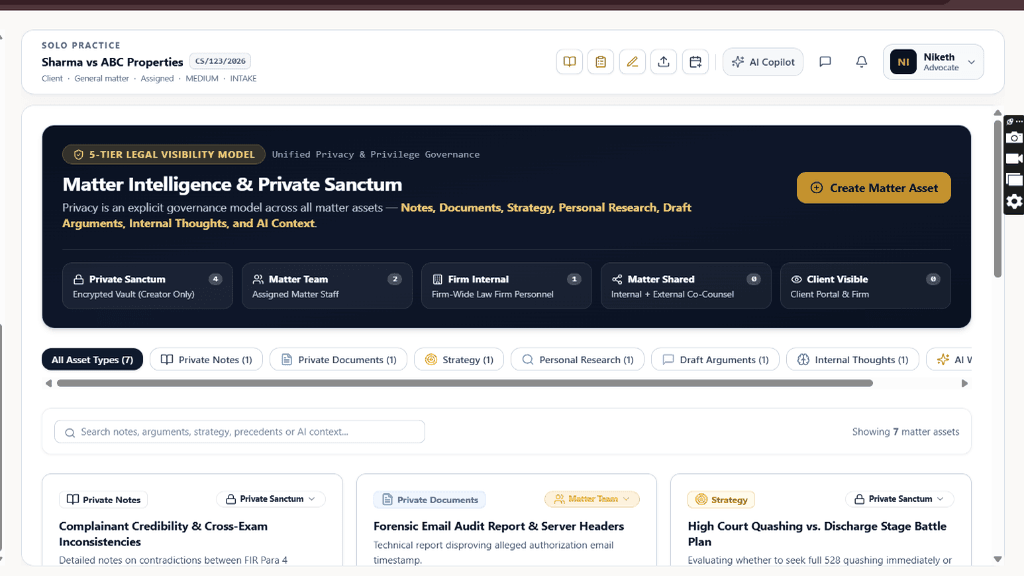
Chamber Authentication Required
Step 1 is shown above as a preview. All remaining procedural steps, litigation blueprints, and interactive controls require an active chamber or firm login.
Frequently Asked Questions
- Can junior advocates in my firm access my Private Sanctum notes?
- By default, Sanctum notes are accessible only to the designated lead advocate. You can selectively grant viewing rights to trusted associates within Firm OS.
- Are AI copilot queries in the Sanctum used to train public models?
- No. All AI processing operates under zero-retention enterprise confidentiality agreements where case data is never stored or used for model training.
Was this guide helpful?
Your feedback directly shapes our support documentation.