Legal OS for Advocates
Guide #2: Lawyer Dashboard
Complete visual guide to the Individual Lawyer Home Page (/lawyer): global search (Ctrl+K), quick action buttons (+ New Matter, Schedule Hearing, Task), 4 KPI summary cards, Needs Attention priority queue, and Today's court hearing timeline.
7 min read•Command Center•Updated October 2026
Prerequisites
- Verified Advocate Account with Bar Council enrollment number
- Active Solo Practice Workspace (/lawyer)
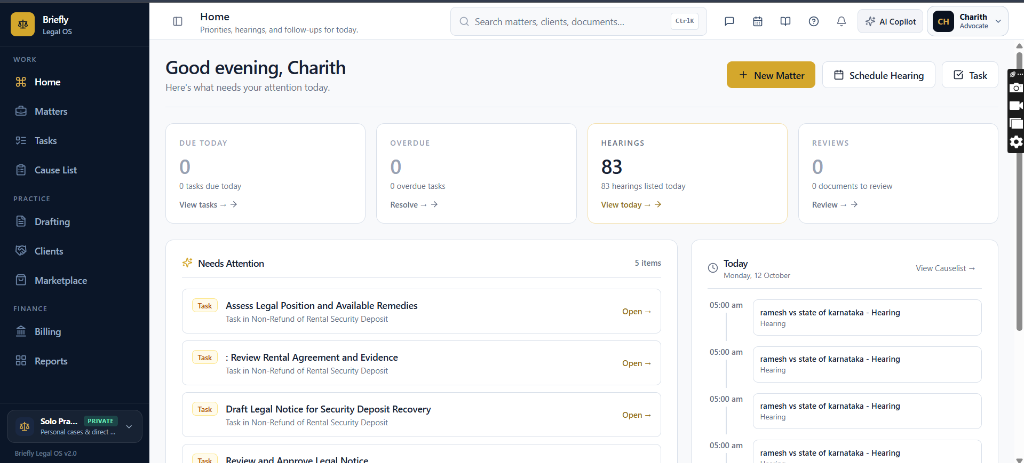
1.Top Navigation Bar, Global Search (Ctrl+K) & Utility Launchers
Use the persistent top navigation header to execute instant case searches, trigger AI assistance, and access quick utility dockets.
Controls:Search matters, clients, documents... (Ctrl+K)Ctrl+K✨ AI Copilot(Header AI assistant launcher)Notifications BellMessagesCalendarCourt DiarySupport Center (?)Profile Dropdown
- Sidebar Toggle [ ◫ ]: Click to expand or collapse the left navigation drawer, optimizing screen width on laptops and tablets.
- Breadcrumb & Subtitle: Displays 'Home' and real-time guidance subtitle: 'Priorities, hearings, and follow-ups for today.'
- Global Search Bar (Ctrl+K): Universal search across all legal matters, clients, FIR numbers, court CNR numbers, and case files.
- Quick Utility Icons: Instant header shortcuts for Messages (/lawyer/messages), Calendar (/lawyer/calendar), Court Diary (/lawyer/diary), Help Center (/help), and Notifications drawer.
- ✨ AI Copilot Launcher: Launches the Briefly AI legal research and drafting assistant modal from any view.
- Advocate Profile Badge: Displays initials and chamber title (e.g., [CH] Charith Advocate). Click to manage chambers, Bar Council KYC, 2FA security, and Cashfree bank accounts.
Chamber Authentication Required
Step 1 is shown above as a preview. All remaining procedural steps, litigation blueprints, and interactive controls require an active chamber or firm login.
Frequently Asked Questions
- Where do the numbers on the 4 top KPI cards come from?
- The KPI cards dynamically calculate real-time data: 'Due Today' and 'Overdue' query your active Tasks table; 'Hearings' counts all court appearances scheduled for the current date; and 'Reviews' tallies drafts in Paper Studio awaiting advocate approval.
- How do hearings on the Today timeline connect with e-Courts cause lists?
- When you add CNR numbers to your matters, Briefly Legal OS automatically pulls cause lists from High Courts and District Courts. Hearings appear on your Today timeline with court hall and item number, updating live during court hours.
- What does the 'Solo Practice (PRIVATE)' badge in the sidebar footer mean?
- Briefly Legal OS supports dual-practice architecture. The 'Solo Practice (PRIVATE)' badge indicates that your current workspace is completely isolated under Section 126/132 attorney-client privilege. Your private cases, client retainers, and evidence vault remain confidential even if you collaborate with partner law firms.
- Can I take courtroom notes directly during a hearing?
- Yes. Click any hearing entry on the Today timeline or Cause List to open the linked Practice Diary notebook. You can record bench queries, witness statements, and immediately click 'Record Outcome' to set the next court date and log daily interim orders.
Was this guide helpful?
Your feedback directly shapes our support documentation.