Guide #1: Individual Lawyer Onboarding
Complete step-by-step walkthrough for independent advocates: sign-up, dual SMS/Email OTP verification, professional profile, Cashfree bank setup, Bar Council KYC dossier upload, and admin approval.
- Active Mobile Phone for SMS OTP verification
- Active Email Address for Email OTP verification
- State Bar Council Enrollment Number (e.g., KAR/2018/12345)
- Digital scan/photo of Bar Council ID / Certificate of Enrollment (Front & Back or PDF, max 15MB)
- Government Photo ID (Aadhaar Card, PAN Card, or Passport)
- Bank Account details (Account Number, IFSC, PAN) for Cashfree Easy Split settlement payouts
1.Initiate Registration from the Home Page
Navigate to the platform home page and click on the 'Sign In' button at the top header.
- You will be redirected to the authentication page at `/auth/login`.
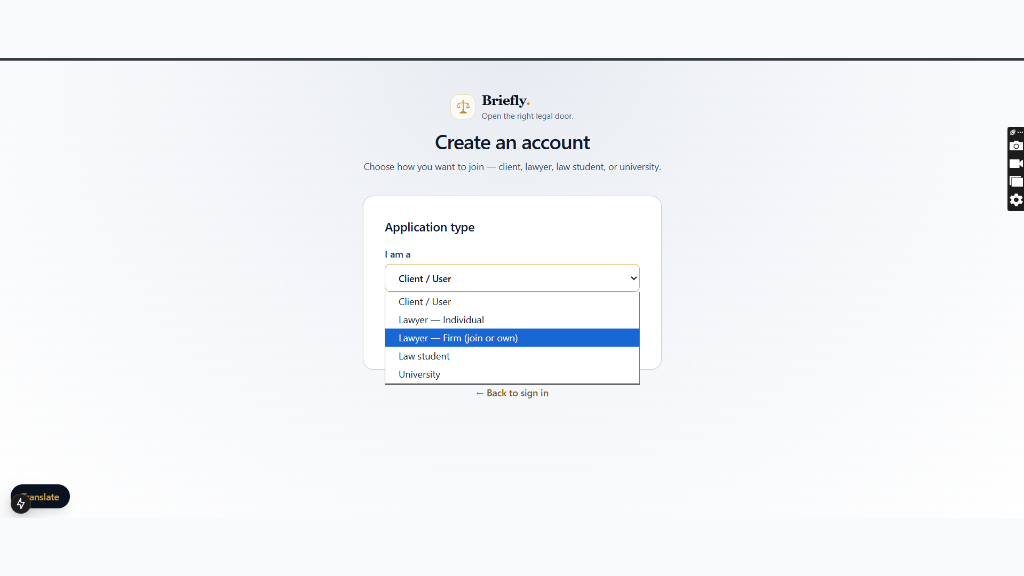
- At the bottom of the sign-in form, click on 'Create an account'.
- A role selection menu will appear. Select 'Lawyer — Individual (Solo practitioner. Admin verifies your bar credentials)' and click 'Continue'.
- Note: Individual solo lawyers do not require a law firm to register. You can join or create a firm organization later from your dashboard.
2.Mandatory Dual OTP Verification (Mobile & Email)
Verify both your registered Indian mobile number and email address using one-time passcodes.
- Enter your 10-digit mobile number and click 'Send OTP'. Enter the 6-digit SMS OTP received via MSG91.
- Enter your active email address and click 'Send OTP'. Enter the 6-digit Email OTP received in your inbox.
- Both mobile and email OTP verifications are strictly mandatory under platform security policies before submitting the form.
Ensure your mobile number and email address are accessible. These credentials will be used for two-factor login, critical hearing alerts, and client notifications.
3.Fill in Professional, Practice & Chamber Information
Provide your professional background, court specializations, consultation fees, and office location.
- Full Name: Enter your legal name as printed on your Bar Council records.
- Bar Council Registration ID: Enter your state bar ID (e.g. `KAR/2018/12345` or `D/1234/2019`).
- Password: Create a secure password (minimum 8 characters with letters, numbers, and symbols).
- Experience: Enter your total years of active bar practice.
- Practice Areas: Comma-separated list (e.g. Criminal Law, Corporate Law, Cyber Crime, Family Law).
- Court Specializations: Comma-separated list (e.g. Supreme Court of India, Delhi High Court, Saket District Court).
- Languages Spoken: Comma-separated list (e.g. English, Hindi, Punjabi).
- Consultation Fee (₹): Enter your standard fee for initial digital or chamber consultations.
- City & Chambers Address: Enter Address Line 1, Address Line 2 (optional), State, and PIN code. This will be displayed on your marketplace profile.
4.Configure Bank Account for Client Payments (Cashfree Easy Split)
Enter your bank account details to receive automated settlements for client invoices and digital consultations.
- Account Holder Name: Must match the advocate's legal name or registered chamber name.
- Account Number & IFSC Code: Direct account number and valid IFSC code (e.g., HDFC0000123).
- PAN Number: 10-digit Income Tax PAN card number for financial compliance and TDS reporting.
- Account Type: Select 'Individual (solo practice)', 'Business', or 'Proprietorship'. Solo advocates do not require GSTIN.
- Cashfree Vendor ID: Optional / auto-generated vendor account for instant on-demand settlement.
- Terms of Service: Review and check 'I agree to the Terms of Service'.
- Click 'Continue' to proceed to document uploads.
100% of client payments and consultation fees are settled directly into your linked bank account via Cashfree Payment Gateway.
5.Upload Verification Credentials (KYC Dossier)
Submit clear, legible digital copies of your State Bar Council ID and Government Identity Proof.
- Accepted file formats: JPG, PNG, WEBP, or PDF (maximum 15MB per file).
- 1. Advocate Bar Council Credentials: Select your State Bar Council (e.g. Bar Council of Delhi), Enrollment Year (e.g. 2026), confirm Bar Council Registration ID, and upload a clear scan of your Bar Council ID Card / Certificate of Enrollment (Front & Back).
- 2. Government Photo ID Verification: Select ID Proof Document Type (Aadhaar Card, PAN Card, or Passport), enter the 12-digit Aadhaar / ID number (recommended), and upload the document photo/scan.
- 3. Supporting Practice Certificate (Optional): Upload your Certificate of Practice (COP) or LL.B/LL.M Degree certificate if available.
- 4. Remarks / Note to Admin Reviewer (Optional): Add any additional notes regarding your chamber practice or bar enrollment.
- Review the certification statement under the Advocates Act and click 'Submit for KYC Verification'.
6.Admin Review & Workspace Activation
Monitor your verification progress on the 'Verification In Progress' dashboard.
- Once submitted, you are redirected to the 'Advocate Verification Status' page.
- The 4-stage lifecycle tracker displays: 1. Account Created (✓), 2. KYC Documents Uploaded (✓), 3. Admin Review (In Progress), 4. Full Workspace (Locked).
- You can review your submitted KYC Dossier, verify document links, or update/re-upload files if necessary.
- Platform compliance administrators verify your enrollment against official State Bar records.
- Once approved by the Admin, you will receive an in-app and email notification, unlocking your full Legal OS workspace (Case Management, Daily Cause Lists, Client CRM, and Marketplace matchmaking).
Ensure your uploaded Bar Council ID Card has legible text and valid enrollment numbers. High-clarity color scans are usually approved within 2-6 business hours.
7.Post-Approval: Configure Profile & Chambers Settings
After admin verification, fine-tune your public advocate profile, chamber address, practice specializations, and payout settings in Lawyer Workspace Settings.
- Navigate to 'Settings' (`/lawyer/settings`) from your profile menu or click 'Update Name' on the dashboard onboarding checklist.
- Lawyer Workspace Settings contains 5 dedicated operational tabs:
- 1. Profile & Chambers: Configure your public advocate identity, professional bio, practice areas, court specializations, spoken languages, initial consultation fee, and chambers street address.
- 2. KYC & Security: View your Bar Council verification badge, manage submitted identity credentials, configure two-factor authentication, and update login password.
- 3. Earnings & Bank Payouts: Manage your linked Cashfree payout bank account for instant digital fee settlements, retainer disbursements, and payout reconciliation.
- 4. Platform Subscription: View your active practice plan, pooled AI quota, evidence vault capacity, and redeem promotional voucher/coupon codes.
- 5. Practice & Firm: Switch between solo independent practice mode and law firm affiliation (join an existing firm or create a new organization).
- Fill in your Profile details: Full Name (e.g. 'Niketh'), Primary Practice City (e.g. 'Bengaluru'), Professional Bio, select Practice Areas (Criminal Law, Civil Litigation, Corporate, Constitutional, etc.), Court Specializations (e.g. 'Karnataka High Court, Bengaluru City Civil Court'), Languages Spoken ('English, Kannada, Hindi'), Consultation Fee (₹1500), and Chambers Address (#24, Richmond Road, 2nd Floor, Bengaluru, Karnataka, 560025).
- Click 'Save Profile & Chambers' to apply changes immediately across your public marketplace card and automated legal documents.
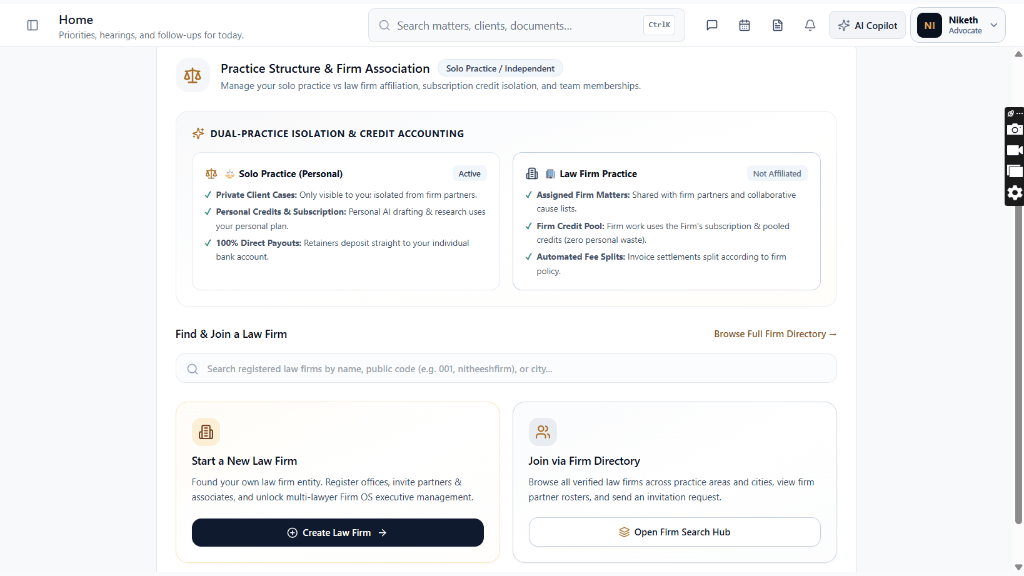
All details updated in 'Profile & Chambers' are automatically reflected in the client marketplace directory, enabling prospective clients to filter by your practice court, language, and jurisdiction.
Ready to put this workflow into practice?
Sign in to your chamber account to manage matters, CNR cause lists, client communications, and billing.
Frequently Asked Questions
- How long does Bar Council KYC verification take?
- KYC verification is typically reviewed by compliance administrators within 2 to 24 hours. You will receive an immediate email confirmation once your workspace is approved.
- Can an individual lawyer join or start a law firm later?
- Yes. From your Legal OS profile settings, you can create a new law firm organization (Firm OS) or accept an invite from an existing firm at any time without re-registering.
- What bank account should solo practitioners link?
- Solo practitioners can link their personal savings or current bank account. Payouts are routed directly through Cashfree Easy Split without requiring GSTIN registration.
- Why are both Mobile and Email OTPs required during signup?
- Under Indian Advocates Act compliance and digital courtroom data protection standards, verified dual-channel authentication is mandatory to prevent unauthorized representation.
- How do promotional vouchers like LAWYER100 work?
- Navigate to 'Platform Subscription' in Settings, enter your voucher code in the 'Promotional Voucher or Coupon Code' card, and click 'Apply Code' to activate free subscription credits.
- How does credit isolation work between Solo and Firm practice?
- Personal client cases use your individual subscription and credits. When working on assigned Law Firm matters, the platform automatically switches to the Firm's pooled credits with zero deduction from your personal balance.
Was this guide helpful?
Your feedback directly shapes our support documentation.