Firm OS & Practice Operations
Firm Matters Directory & Master Case Ledger
Comprehensive master control center for institutional, corporate, and litigation matters: automated 16-digit CNR tracking, practice group tagging, staffing rosters, 6 multi-dimensional analytical views (Portfolio, Kanban, Timeline, Risk Matrix, Revenue Matrix, Court Calendar), and intake queue triage.
12 min read•Firm OS Enterprise•Updated October 2026
1.Command Bar & Header Governance Controls
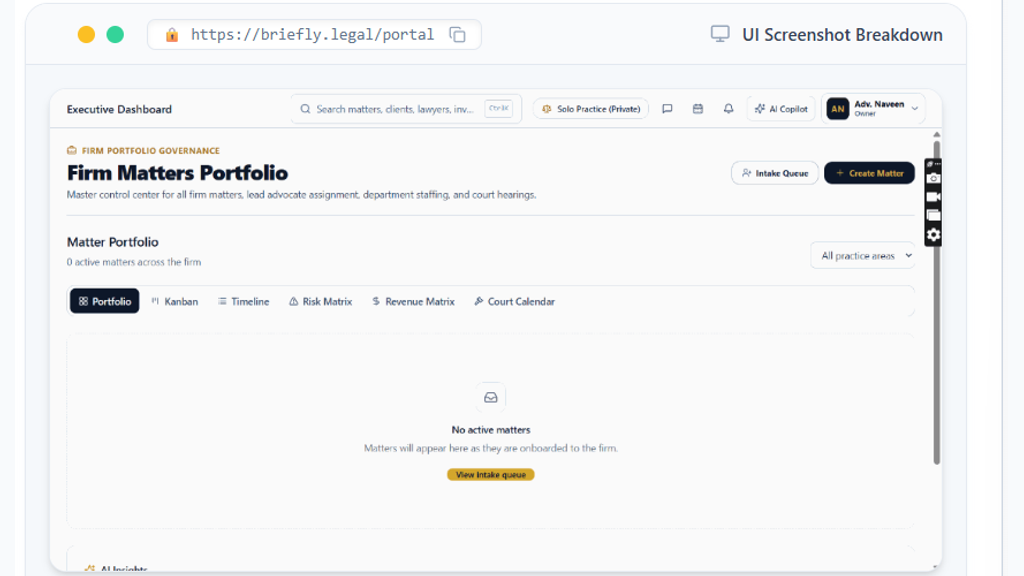
Understand and utilize the top governance bar to switch practice modes, trigger AI case discovery, and launch matter creation.
Controls:Solo Practice (Private) Switch(Chamber / Firm context switcher)Global Search (Ctrl+K)(Omni-search across matters & clients)AI Copilot(Launches AI legal drafting & CNR discovery)Intake Queue(Unprocessed advisory leads & intake briefs)+ Create Matter(Primary action button)
- Why it is there: To provide instant access to high-priority practice controls without leaving your current workspace view.
- How it helps: Allows partners to switch between private individual briefs and firm-wide collective dockets while maintaining strict ethical data separation.
- Search Command (Ctrl+K): Global omni-search indexing all active matters, clients, arguing advocates, GST invoices, and 16-digit CNR numbers.
- Solo Practice (Private) Switcher: One-click toggle between your personal private chamber practice and the shared Law Firm Enterprise repository.
- AI Copilot Button: Launches the platform legal intelligence assistant to draft petition summaries, cross-examine case law, or perform automated CNR status lookups.
- User Profile & Ownership Badge: Displays verified Bar Council identity and administrative ownership tier (e.g. Adv. Naveen - Owner) with RBAC privileges.
- Intake Queue Button: Opens the staging inbox of unprocessed client inquiries, digital consultations, and retainer proposals awaiting conflict check clearance.
- + Create Matter Button: Opens the rapid matter creation modal to register new court briefs, arbitration dockets, or corporate advisory mandates.
Chamber Authentication Required
Step 1 is shown above as a preview. All remaining procedural steps, litigation blueprints, and interactive controls require an active chamber or firm login.
Frequently Asked Questions
- How does the Firm Matters Portfolio ensure client confidentiality and conflict checking?
- Every matter in Firm OS is governed by role-based access control (RBAC). Furthermore, Ethical Chinese Walls can be configured under Document Governance to isolate confidential matters from unauthorized associates and RAG search indexing.
- Can I link an existing case using its 16-digit e-Courts CNR number?
- Yes. When clicking '+ Create Matter', enter the 16-digit CNR number (e.g. DLSW010012342026). The system will automatically fetch past order sheets, parties, court complex, and next date of hearing from official court registries.
Was this guide helpful?
Your feedback directly shapes our support documentation.