Firm OS & Practice Operations
Firm Action Center & Urgent Triage Command
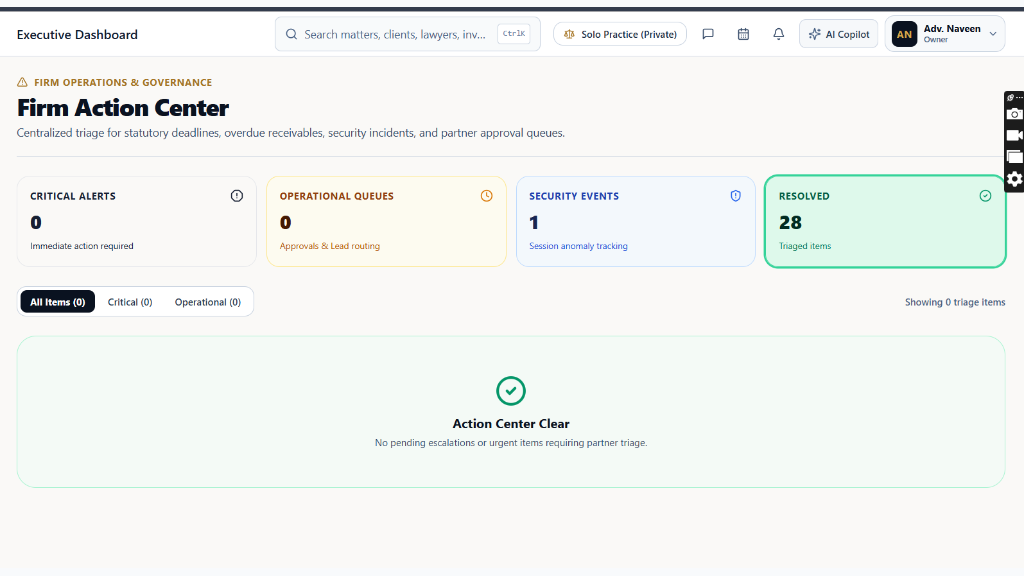
Centralized priority queue for operational emergencies: 4 dedicated triage streams (Statutory Limitations <48h, Two-Stage Partner Redline Reviews, Unassigned Inbound Leads, and Escrow Payout Releases), priority filtering, and 1-click partner sign-off.
10 min read•Firm OS Enterprise•Updated October 2026
1.Action Center Command Overview & Triage Queue
Open 'Action Center' in the COMMAND CENTER sidebar section to review pending urgent items.
Controls:All Items Priority Filter(Filter by urgency level)Critical Urgency Badge(Red alert (<24h to deadline))Approve Sign-Off(1-click authorization)
- Why it is there: To prevent procedural defaults under CPC/CrPC and eliminate operational bottlenecks in the partner approval chain.
- How it helps: Consolidates time-sensitive approval requests, limitation countdowns (<48 hours), and client intakes into one urgent queue.
- Priority Filters: Filter by 'Critical' (Statutory limitation expiring <24h), 'High' (Partner redline pending review), or 'Routine' (Standard disbursement approvals).
Chamber Authentication Required
Step 1 is shown above as a preview. All remaining procedural steps, litigation blueprints, and interactive controls require an active chamber or firm login.
Frequently Asked Questions
- How quickly are limitation alerts refreshed in the Action Center?
- Limitation countdowns update every 60 seconds and synchronize automatically with court registry daily cause lists and e-filing status webhooks.
Was this guide helpful?
Your feedback directly shapes our support documentation.