Case & Matter Management
Guide #21: People & Witnesses
Manage litigating parties, opposing advocates, witness depositions, and launch encrypted privileged client discussion threads.
6 min read•People, Witnesses & CRM Messaging•Updated October 2026
Prerequisites
- Active Matter Workspace (/cases/[id])
- Stakeholder contact details: petitioners, respondents, opposing counsel, or trial witnesses
1.Manage Parties, Counsels & Witnesses Directory
Navigate to `/cases/[id]?tab=people` to manage lead advocates, petitioners, respondents, witnesses, and expert commissioners.
Controls:People Tab+ Link Person+ Add Witness
- Role Categorization: Tag individuals as 'Client / Petitioner', 'Respondent / Accused', 'Opposing Counsel', 'Witness (Fact / Expert)', or 'Court Commissioner'.
- Contact Repository: Store email, phone, chambers address, and Bar Council enrollment number for opposing counsels.
- Witness Registry: Log witness sequence numbers (PW-1, DW-1), summon issuance dates, and planned cross-examination bullet points.
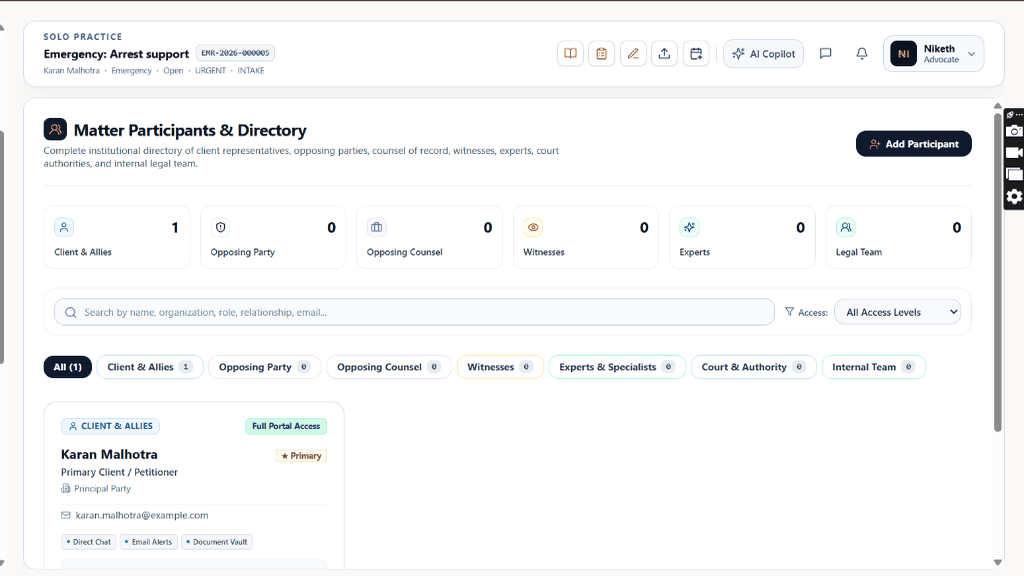
Chamber Authentication Required
Step 1 is shown above as a preview. All remaining procedural steps, litigation blueprints, and interactive controls require an active chamber or firm login.
Frequently Asked Questions
- Are messages exchanged in the Case Chat visible to opposing parties?
- Never. Case chat channels are strictly confidential between the advocate chamber and the authenticated client.
- Can I export chat logs if needed for court records or client billing?
- Yes. You can export a timestamped PDF transcription of client communications for billing audit trails.
Was this guide helpful?
Your feedback directly shapes our support documentation.