Legal OS for Advocates
Guide #26: Solo & Firm Practice
Master the dual-practice architecture: complete private matter isolation for solo practice, pooled firm AI credits, 100% direct client payouts vs firm fee splits, and seamless firm directory affiliation.
6 min read•advanced•Updated October 2026
Prerequisites
- Active Advocate Account (Solo Practice initialized)
- Basic understanding of case creation & billing
1.Access Practice Structure & Firm Association
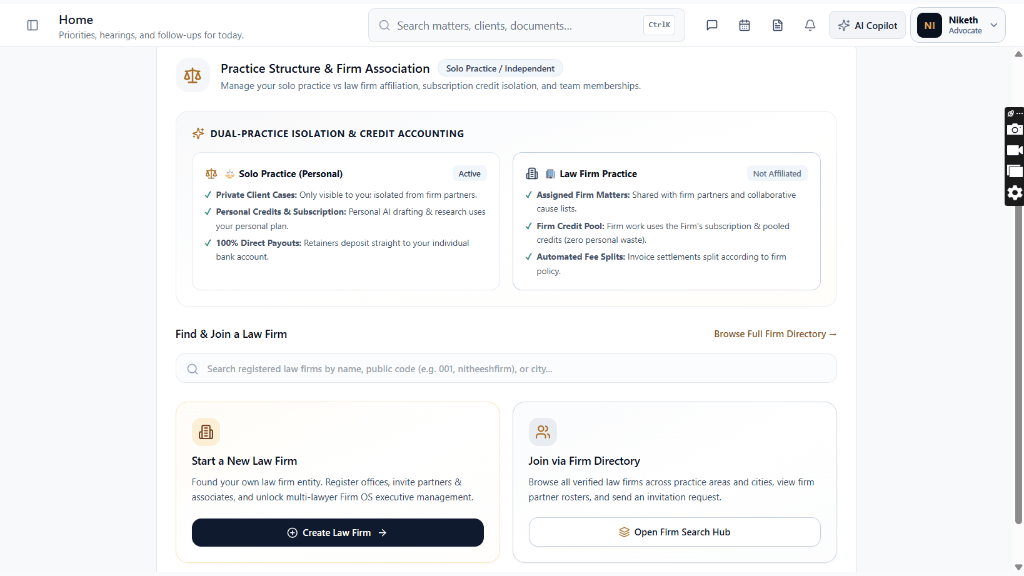
Navigate to your Practice Structure dashboard from the top navigation avatar menu or direct route /lawyer/practice-structure.
Controls:Practice Structure Menu Item(Under user profile menu)
- Displays active badge: 'Solo Practice / Independent'.
- Header tagline: 'Manage your solo practice vs law firm affiliation, subscription credit isolation, and team memberships.'
Chamber Authentication Required
Step 1 is shown above as a preview. All remaining procedural steps, litigation blueprints, and interactive controls require an active chamber or firm login.
Frequently Asked Questions
- If I join a law firm, will firm partners see my private solo cases?
- No. All cases created under your Solo Practice identity remain strictly private and isolated. Firm partners only have visibility over cases explicitly created in or assigned within the Law Firm workspace.
- Whose AI credits are used when working on a firm matter?
- When working inside an assigned firm matter, all AI Copilot drafts, research queries, and OCR runs automatically deduct from the Law Firm's pooled enterprise subscription, leaving your personal credits intact.
- Can I leave a law firm without losing my personal court diary?
- Yes. Your solo practice history, private clients, personal documents, and court diary remain fully intact in your advocate workspace even if you leave or disaffiliate from a law firm.
Was this guide helpful?
Your feedback directly shapes our support documentation.