Legal OS for Advocates
Guide #27: Subscriptions & AI Credits
Comprehensive self-serve billing guide: real-time AI credits quota meter (4,000 monthly credits), Bar Council promotional voucher code activation (e.g. LAWYER100), solo practice tier comparisons, and Cashfree recurring autopay mandates.
6 min read•advanced•Updated October 2026
Prerequisites
- Active Advocate Account
- Access to Lawyer Workspace Settings (/lawyer/business?tab=subscription)
1.Access Platform Subscription Tab
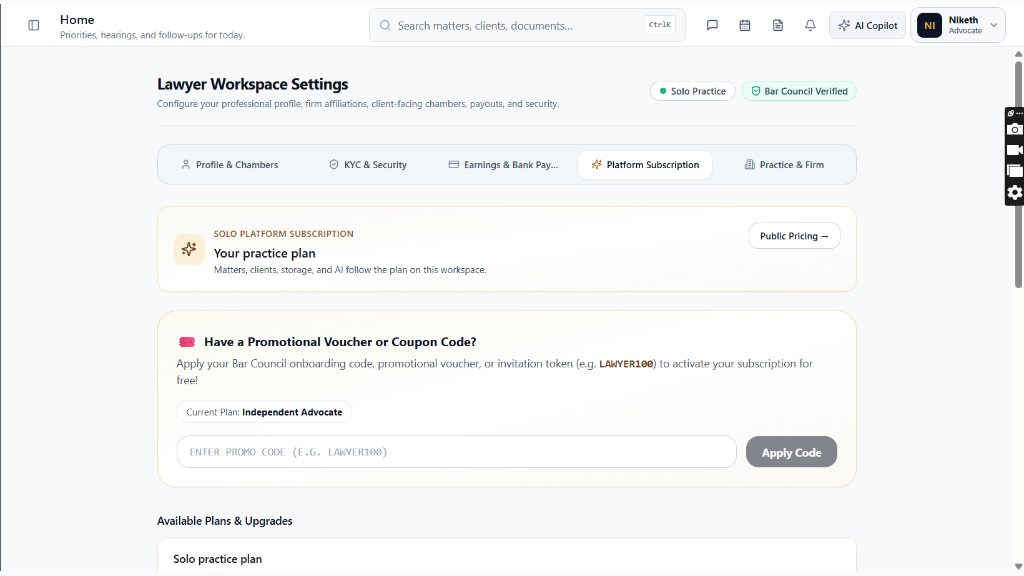
From Lawyer Workspace Settings (/lawyer/business), switch to the 'Platform Subscription' tab.
Controls:Platform Subscription TabPublic Pricing Link
- Header status badges confirm: 'Solo Practice' and 'Bar Council Verified'.
- Top card 'Your practice plan' confirms: 'Matters, clients, storage, and AI follow the plan on this workspace.'
- Click 'Public Pricing ->' to view external public tier comparisons at any time.
Chamber Authentication Required
Step 1 is shown above as a preview. All remaining procedural steps, litigation blueprints, and interactive controls require an active chamber or firm login.
Frequently Asked Questions
- What happens when my 14-day Professional free trial concludes?
- You will receive in-app alerts and email notifications before the trial concludes. You can choose to continue on Professional via Cashfree autopay, switch to Starter (₹499/mo), or redeem a Bar Council promotional code. Your case data and diary entries remain completely safe.
- Do unused AI credits roll over to the next month?
- Monthly AI credits reset each billing cycle to maintain high-performance server allocations. For higher monthly quotas, advocates can upgrade to Premium (15,000 credits).
- Can I claim GST Input Tax Credit on my platform subscription?
- Yes. Legal OS issues GST-compliant tax invoices under SAC 998211 containing your registered GSTIN, allowing you to claim 18% GST Input Tax Credit (ITC).
Was this guide helpful?
Your feedback directly shapes our support documentation.