Legal OS for Advocates
Guide #11: Practice Reports & Analytics
Monitor case resolution velocity, hearing realization rates, court workload distribution, billable recovery, and export executive chamber MIS reports.
6 min read•Analytics, MIS & Velocity•Updated October 2026
Prerequisites
- Active Lawyer Account with logged court listings, matters, and fee invoices
1.Analyze High-Level Practice KPIs & Realization Rates
Navigate to `/lawyer/reports` to inspect chamber-wide operational health and litigation velocity.
Controls:Practice Reports TabTime Horizon SelectorPeriod Compare Toggle📥 Export MIS Report
- Closed Share %: Percentage of lifetime matters successfully disposed, decreed, or settled.
- Average Matter Age: Mean lifespan of active dockets (e.g. 14.2 months across High Court and Trial Courts).
- Hearing Realization Rate %: Percentage of scheduled court listings where substantive arguments or orders were passed versus adjournments.
- Period Comparison Toggle: Compare performance quarter-over-quarter (QoQ) or year-over-year (YoY).
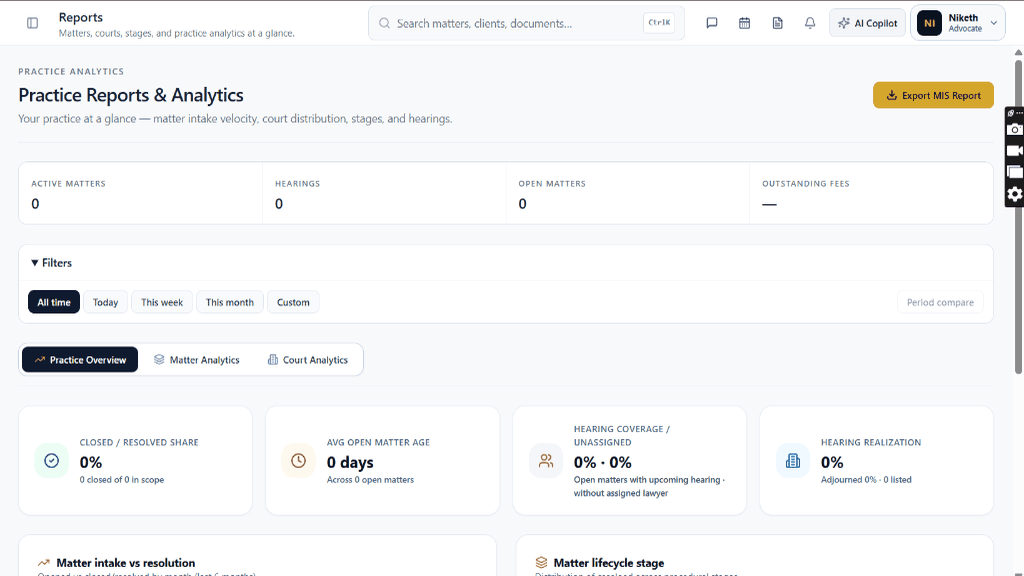
Chamber Authentication Required
Step 1 is shown above as a preview. All remaining procedural steps, litigation blueprints, and interactive controls require an active chamber or firm login.
Frequently Asked Questions
- How is the 'Hearing Realization Rate' calculated?
- Hearing Realization measures the proportion of listed court appearances resulting in effective proceedings (arguments heard, witness examined, order reserved) rather than routine adjournments.
- Can I filter analytics by specific judicial courts or bench halls?
- Yes. Use the 'Court Analytics' sub-tab to view matter statistics segmented by High Court, City Civil Court, NCLT, or District Sessions benches.
Was this guide helpful?
Your feedback directly shapes our support documentation.