Legal OS for Advocates
Guide #9: Marketplace & Client Inquiries
How advocates discover client representation inquiries, respond to time-critical emergency arrest and bail alerts, submit structured fee proposals, and onboard new matters instantly.
6 min read•Marketplace & Client Inquiries•Updated October 2026
Prerequisites
- Active Verified Lawyer Account (Approved Bar Council KYC)
- Designated Practice Areas and Court Jurisdiction preferences configured in Profile Settings
1.Browse Discover Feed by Practice Area & Court District
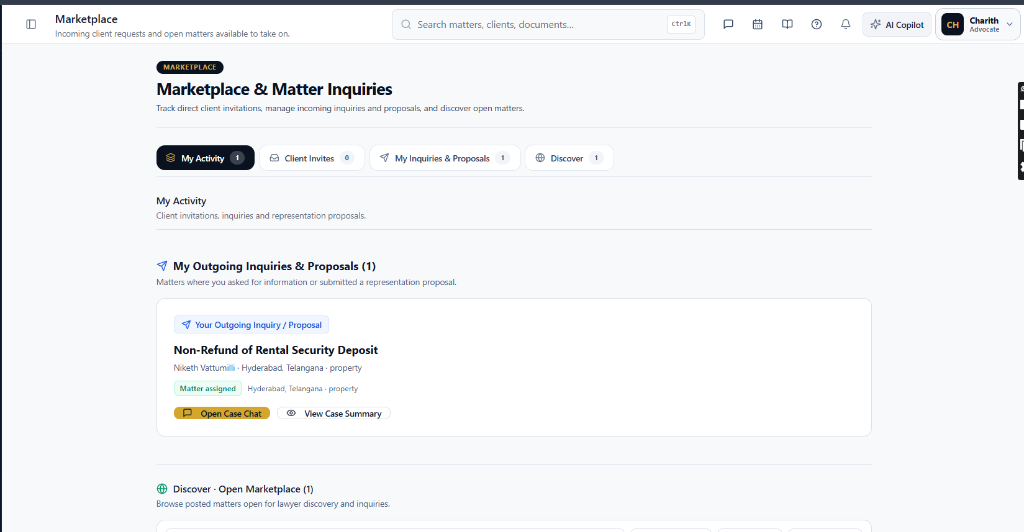
Navigate to `/lawyer/marketplace` to explore verified client inquiries seeking legal representation.
Controls:Marketplace TabPractice AreaLocation / ForumPriority Selector
- Practice Area Filters: Filter across Criminal Defense, Property Litigation, Corporate & Commercial, Matrimonial, Cheque Bounce (138 NI Act), and Writ Petitions.
- Court District & Forum: Select preferred forums (e.g. 'High Court of Delhi', 'Patiala House Courts', 'City Civil Court Bengaluru').
- Inquiry Cards: Review matter scope, client budget range, urgency level, and summary facts verified by Briefly intake triage.
Chamber Authentication Required
Step 1 is shown above as a preview. All remaining procedural steps, litigation blueprints, and interactive controls require an active chamber or firm login.
Frequently Asked Questions
- Does Briefly violate Bar Council rules regarding lawyer solicitation?
- No. Briefly Marketplace operates strictly on an invitation-only model where clients initiate specific requests for assistance or emergency counsel in compliance with BCI Standards of Professional Conduct.
- How do emergency client fee payouts settle to my account?
- Emergency retainer fees are held in escrow and settled directly into your linked bank account via instant IMPS payout within 2 business hours of filing or appearance proof upload.
Was this guide helpful?
Your feedback directly shapes our support documentation.