Case & Matter Management
Guide #24: Case Audit & Closure
Monitor immutable activity audit logs and execute the 4-step formal case closing, zero-balance verification, and decree archival protocol.
6 min read•Audit & Closure Protocol•Updated October 2026
Prerequisites
- Active Matter Workspace (/cases/[id])
- Concluded litigation with certified final order/judgment or settlement decree
- Reconciled matter invoices and client trust funds ledger
1.Inspect Immutable Activity Audit Logs
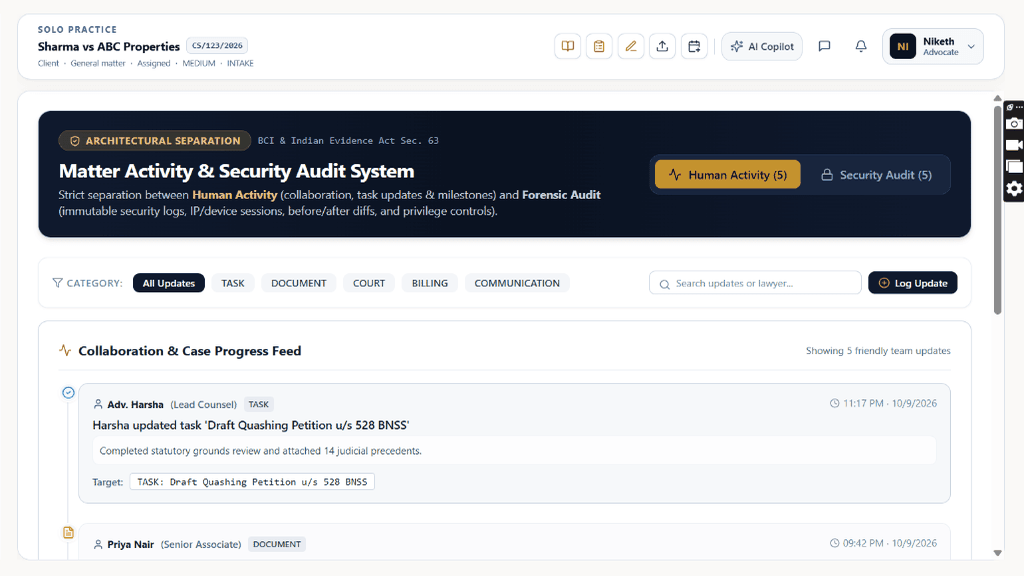
Navigate to `/cases/[id]?tab=audit` to inspect chronological activity history with cryptographic SHA-256 integrity hashes.
Controls:Audit Trail TabFilter EventsExport Audit Certificate
- Every action inside the matter workspace—filing updates, evidence uploads, milestone payments, hearing outcomes, and notes edits—is immutably recorded.
- Filter audit logs by: 'All Events', 'Pleadings & Filings', 'Hearings & Cause List', 'Financials & Invoicing', or 'Access & Permissions'.
- Export a certified 'Matter Audit Log Certificate' PDF for court compliance or client chamber reporting.
Chamber Authentication Required
Step 1 is shown above as a preview. All remaining procedural steps, litigation blueprints, and interactive controls require an active chamber or firm login.
Frequently Asked Questions
- Can I delete a case completely instead of archiving?
- Briefly follows Bar Council record retention guidelines. To prevent accidental data loss, cases are archived. Administrators can permanently purge draft matters that contain no court filings.
- What happens to the linked client's portal access upon case archival?
- The client retains read-only access to download the final certified decree and tax invoices from their Client Portal.
Was this guide helpful?
Your feedback directly shapes our support documentation.