Firm OS & Practice Operations
Firm Time & Billing Ledger Management
Granular billable hour tracking, multi-tier rate card configuration, unbilled WIP ledger, litigation disbursement management, and partner billing verification.
10 min read•Firm OS Enterprise•Updated October 2026
1.Master Time & Billing Ledger Overview
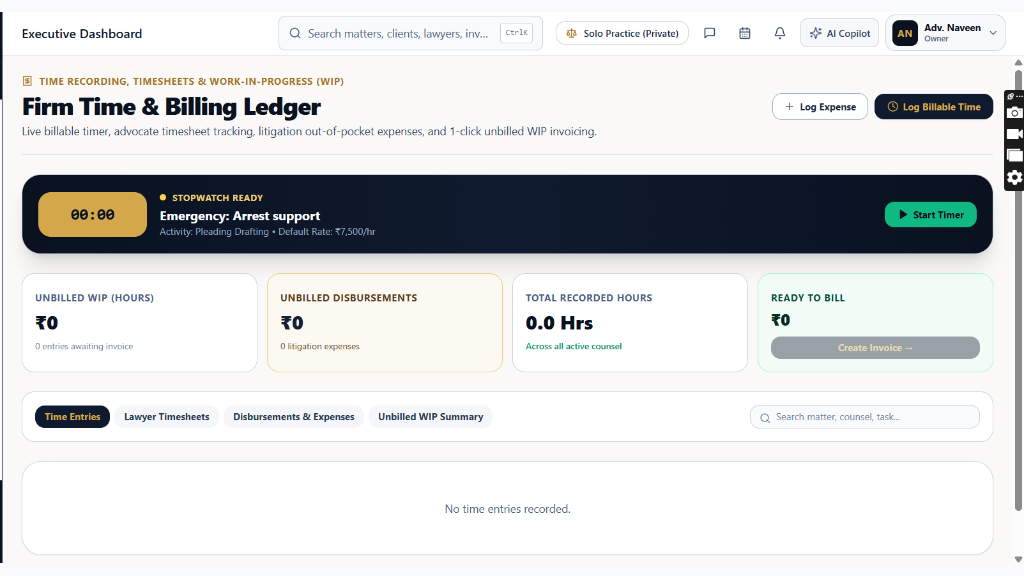
Select 'Time & Billing Ledger' from the FINANCE & BILLING sidebar section to monitor billable production and litigation expenses.
Controls:+ Log Billable Time(Record advocate hours)+ Log Disbursement(Record court filing costs)Fee Earner Filter(Filter by lawyer)
- Why it is there: Serves as the central recording engine for all billable hours, drafted pages, and out-of-pocket litigation expenses across the firm.
- How it helps: Prevents billing leakage, standardizes hourly rates across seniority tiers, and accelerates month-end invoice generation.
- Telemetry Tracked: Total Unbilled WIP Value, Realized Billed Hours this Month, Pending Associate Time Entries, and Logged Disbursements.
Chamber Authentication Required
Step 1 is shown above as a preview. All remaining procedural steps, litigation blueprints, and interactive controls require an active chamber or firm login.
Frequently Asked Questions
- Can associates view the billing rates of senior partners?
- No. Associate accounts only see their own hourly rate. Master rate card tables and partner billing rates are restricted to Partner and Admin tiers.
Was this guide helpful?
Your feedback directly shapes our support documentation.