Firm OS & Practice Operations
Firm Staff & Paralegals Directory
Directory for court clerks, paralegals, litigation executives, and administrative staff: filing queue allocations, document OCR processing, certified copy retrieval, and physical court logistics.
8 min read•Firm OS Enterprise•Updated October 2026
1.Manage Support Staff & Court Clerks
Select 'Staff & Paralegals' under PEOPLE & ORG in the sidebar.
Controls:+ Add Staff MemberCourt Complex Filter
- Why it is there: To organize paralegals, court clerks, and administrative executives handling registry filings.
- How it helps: Ensures clear ownership of physical filing queues, certified copy tracking, and document indexing.
- Shows: Staff Name, Assigned Court Complex (High Court / City Civil / NCLT), Active Task Queue.
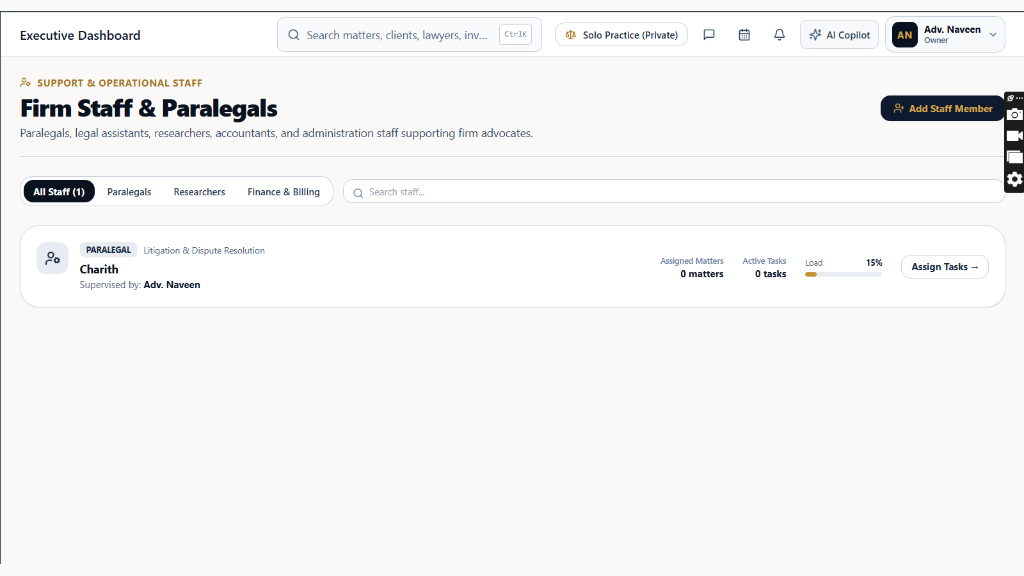
Chamber Authentication Required
Step 1 is shown above as a preview. All remaining procedural steps, litigation blueprints, and interactive controls require an active chamber or firm login.
Frequently Asked Questions
- Who in the firm can perform actions in Firm Staff & Paralegals Directory?
- Managing Partners, Equity Partners, and authorized administrators have full write permissions according to the firm's RBAC matrix.
Was this guide helpful?
Your feedback directly shapes our support documentation.